





Turns out everyone's product is frustrating

Contents
It's been over a month since we launched Replay Vision, our AI layer that watches batch session recordings and reports on them, so it's time to check the data: What are people actually doing with it? Apparently, there's a lot of rage everywhere.
Replay Vision points scanners at your session recordings, and then summarizes the findings. A scanner is a standing instruction for Replay Vision. You write what to look for, pick what you want back (a flag, a 1-5 score, a tag, or a written summary), and set filters for which recordings it watches. It checks new sessions every few minutes and returns observations, each one citing the moment in the recording it came from.
Since the launch on August 3, people have created 11,519 scanners across 5,938 organizations. Most fit more than one of the four categories below, which is why the percentages add up to more than 100. (For authenticity purposes, I haven't fixed the typos. Real people typed these.)
1. UX friction/rage-click detection (41%)
The data shows the dominant use case falls under UX friction/rage-click detection. We have a built-in Frustration score scanner that users seem to pick up immediately. This scanner is easy to set up, and it answers the question: How frustrating is it to engage with my product? (On a 1-5 scale.)
This is also the most commonly reused template – customers gravitate to the built-in Frustration score starting point more than any other.
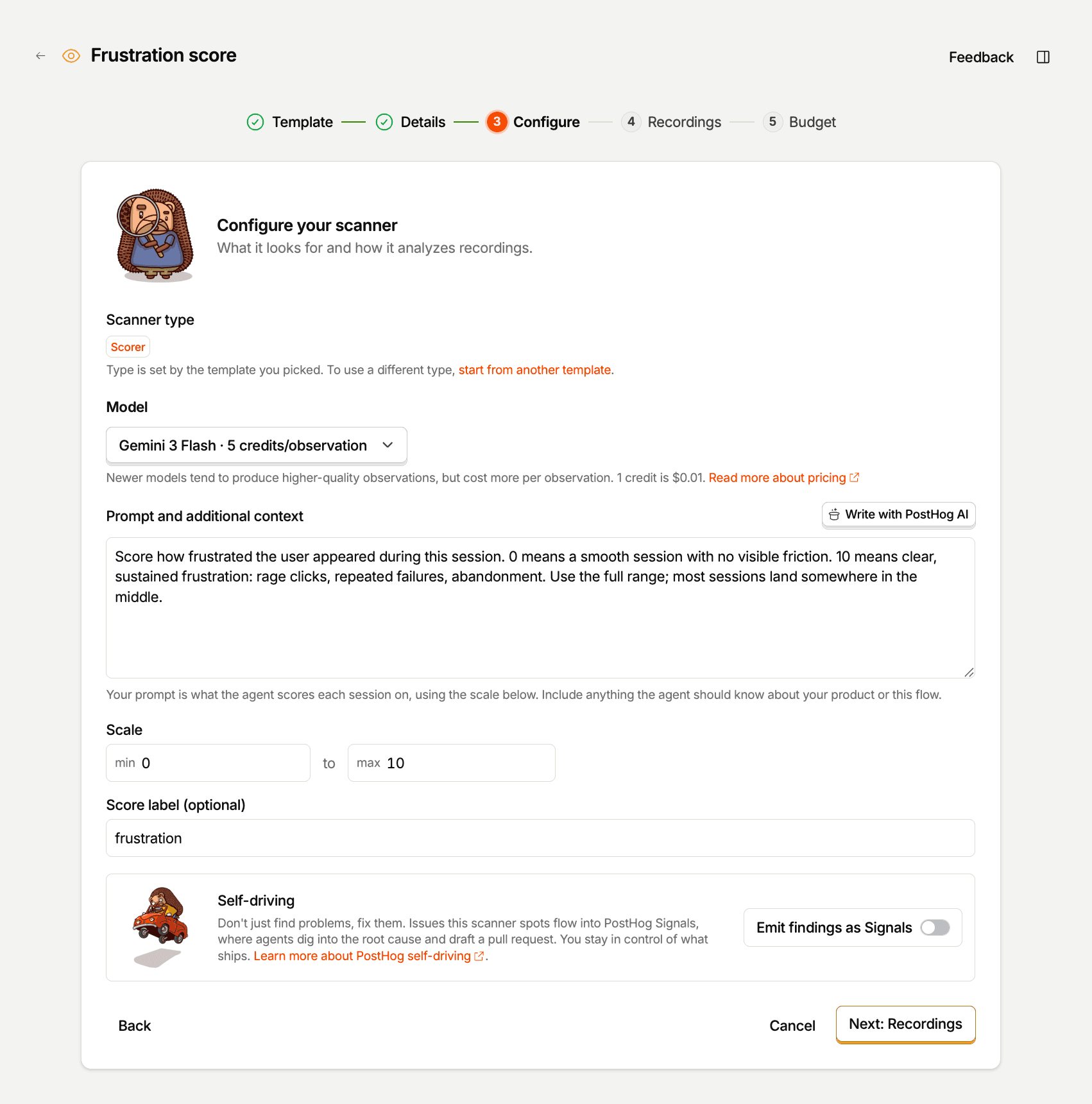
They also set up custom scanners that measure similar metrics, like "Session UX and Friction Summary" or "Sign-in authentication struggle," which measures unresponsive forms, delays in receiving a verification code, or repeated credential attempts.
Common prompts for UX friction/rage-click detection
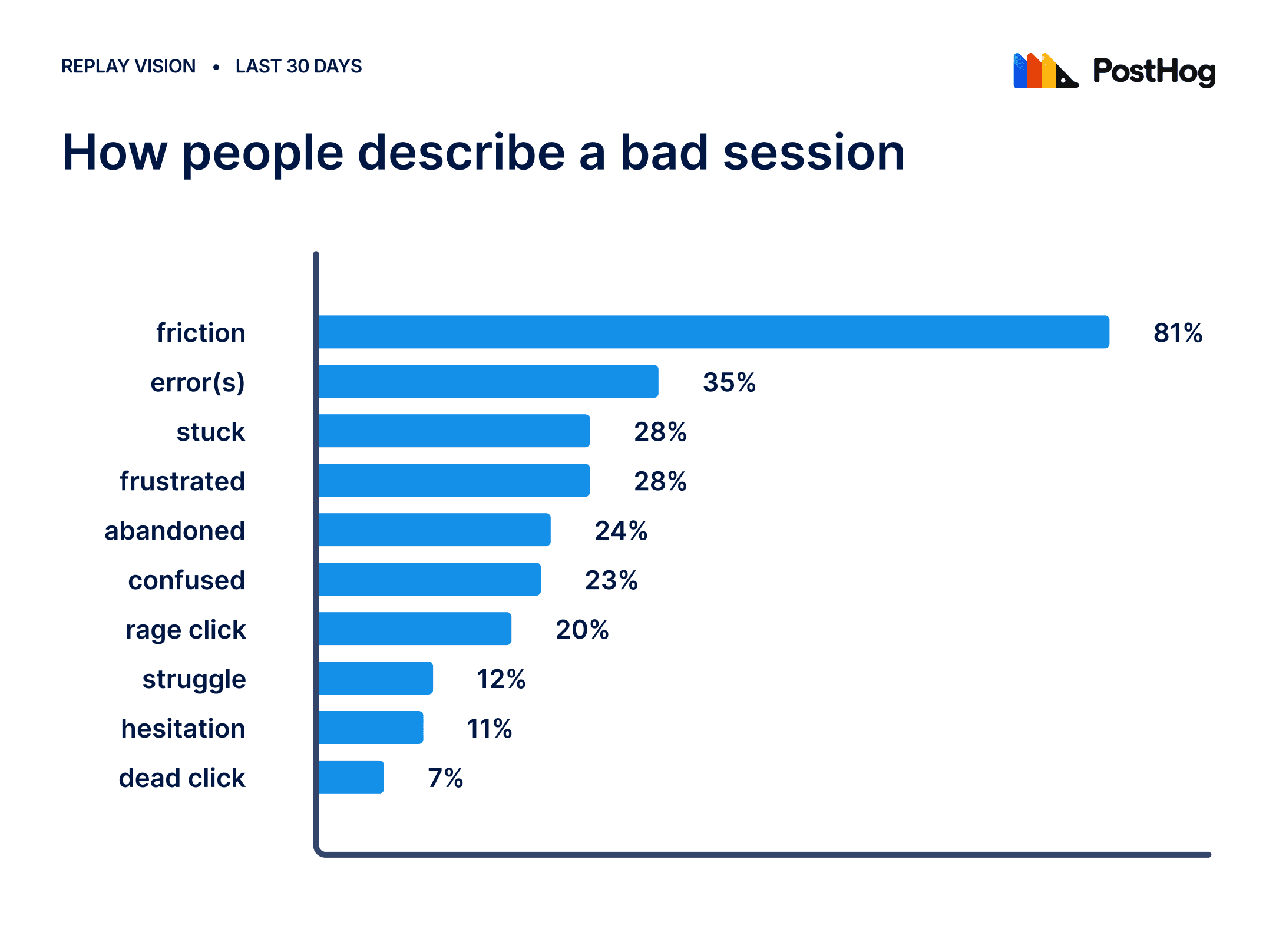
"Stuck" is the single most common word customers reach for:
- "Find sessions where users get stuck on mobile"
- "find sessions where users get stuck on checkout"
- "Find sessions where users get stuck on the /offer page"
- "find sessions where users get stuck during onboarding" (this near-exact phrase recurs across multiple, unrelated orgs)
- "Find where users get stuck while onboarding. Why do some users not proceed with any action after signing up"
- "find session where users get stuck during onboarding"
Frustration/annoyance, named directly:
- "find sessions where users get frustrated with the book editor"
- "Find issues that frustrate users"
- "Find the most painful parts of the web app for users"
- "I need to track annoying popups, mobile ui flaws etc"
Combined error + friction (very common pairing):
- "Find sessions where users saw an error or got stuck"
- "Look users sessions where our AI failed and user got stuck"
- "Find sessions where user didn't manage to pay because of an error or UX problem"
- "find session initiated to pay roll by credit card but user get lost"
Struggle, phrased as a direct question:
- "Understand users struggle in PostHog"
- "find sessions where the user tried to model company scenarios but struggle in doing so"
Some words people use to describe a bad session:
2. Conversion/drop-off analysis (40%)
This category is mostly about money. Why doesn't it come in? If you set up a scanner, it could tell you about billing flow errors, like a checkout button not working, or users getting stuck somewhere along the way before they even reach the step where they enter their credit card number. (It might also be because your product's too expensive or a competitor has a better offer, but you can't find that out with a scanner, sorry.)
Not everything is a payment page, though. Examples:
- a buyer portal people abandon,
- a product an org wants more people to actually use ("I want more adoption and usage out of them"),
- and setup/onboarding: where people hesitate and where they leave.
Prompts vary by industry:
- travel companies watch booking flows,
- food companies watch catering pages,
- job boards watch where people land from Google,
- a fintech watches whether people finish paying an overdue invoice,
- and a Stripe Connect business watches whether merchants finish signing up.
Common prompts for conversion/drop-off analysis
The recurring anchor word here is "onboarding" and "stuck" together, plus a lot of explicit "why" framing:
Onboarding/signup drop-off (the largest cluster by far):
- "Find where users get stuck in onboarding" / "find sessions where users get stuck during onboarding" (this near-identical phrase recurs across many unrelated orgs, it's clearly the most natural way people phrase this)
- "Find sessions where users get stuck during onboarding and do not create an account or login"
- "Categorize the specific stage or feature where users stall or drop off during onboarding"
- "Find people that try to sign up but can't"
- "find users who began registration flow dropped off"
Checkout/payment failure:
- "why users abandon checkout"
- "Find sessions where user didn't manage to pay because of an error or UX problem"
- "find session initiated to pay roll by credit card but user get lost"
Broad "why aren't we converting," asked almost like a business question, not a UI spec:
- "I want to understand why are we not converting to paid users"
- "i am trying to understand where a customter getting stuck and why is sales not happening"
- "I want to track our Donation Page layout and get as much data as possible to get insights to improve the conversion of that page"
Landing-page / content-engagement framing tied to conversion:
- "I want you to watch landing page recordings and tell me where people are dropping off"
- "Find where does users spend most time on the page and what is the general patterns for users who convert to reserve"
- "I want to know for people who converted on Mobile how far did they scroll when reaching the holiday page"
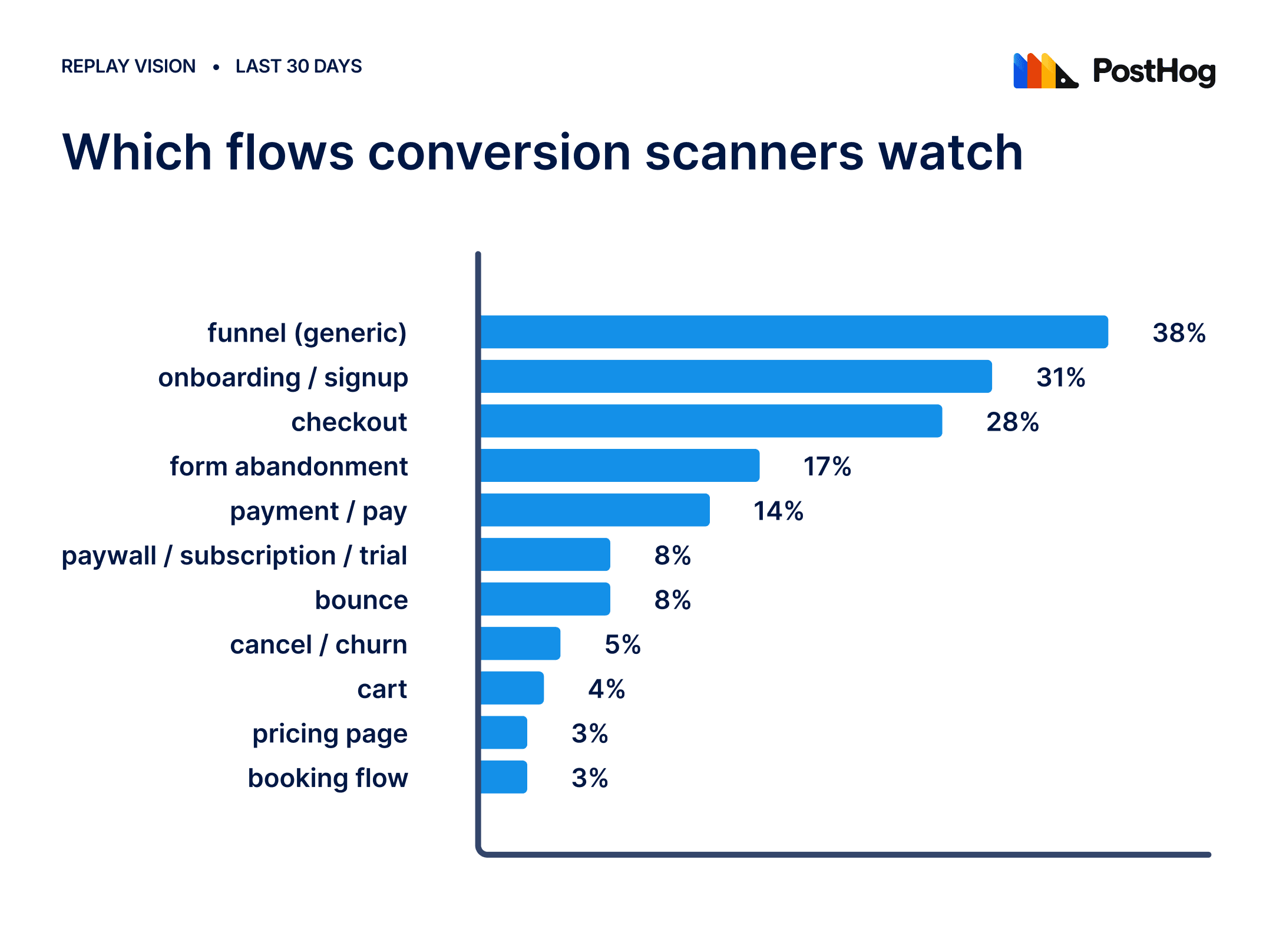
Here are the most common flows conversion scanners watch:
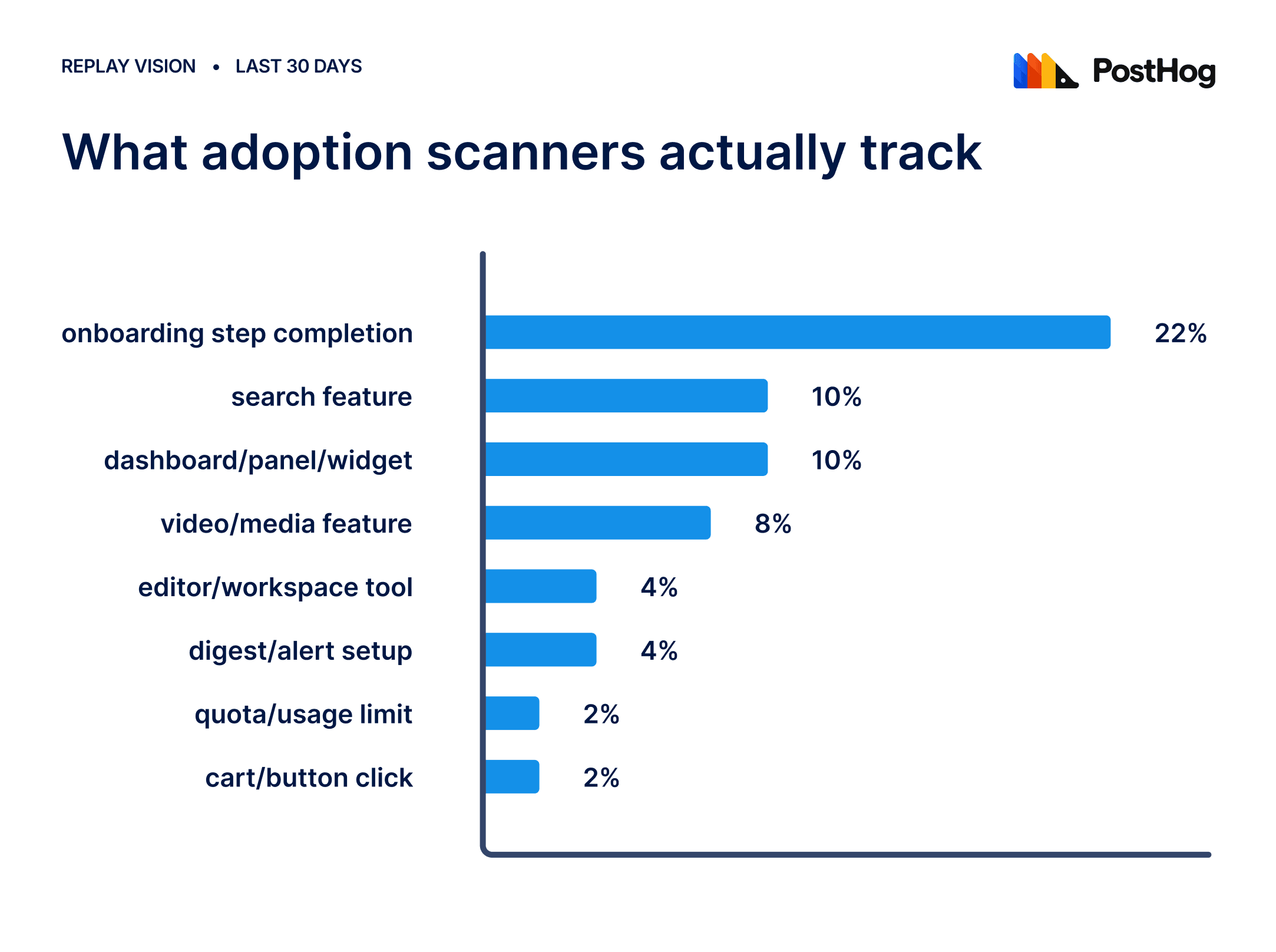
3. Feature adoption/usage tracking (21%)
As an engineer or a product manager, you probably have this question on your mind a lot: Does anyone use this thing I shipped? Most users just ask about usage, but some go a bit deeper, asking how people use it, like getting into what parts of the page they focus on, interaction types, whether people hit their limits, etc.
In general, these are product-specific questions, so there's little overlap. Still, it's worth skimming for ideas. "Conversational onboarding completion" is someone confirming a freshly rolled-out onboarding flow does what it should. "First login user interaction and confirmation" walks through five separate steps of inviting someone to a workspace to see where people land. You get the gist.
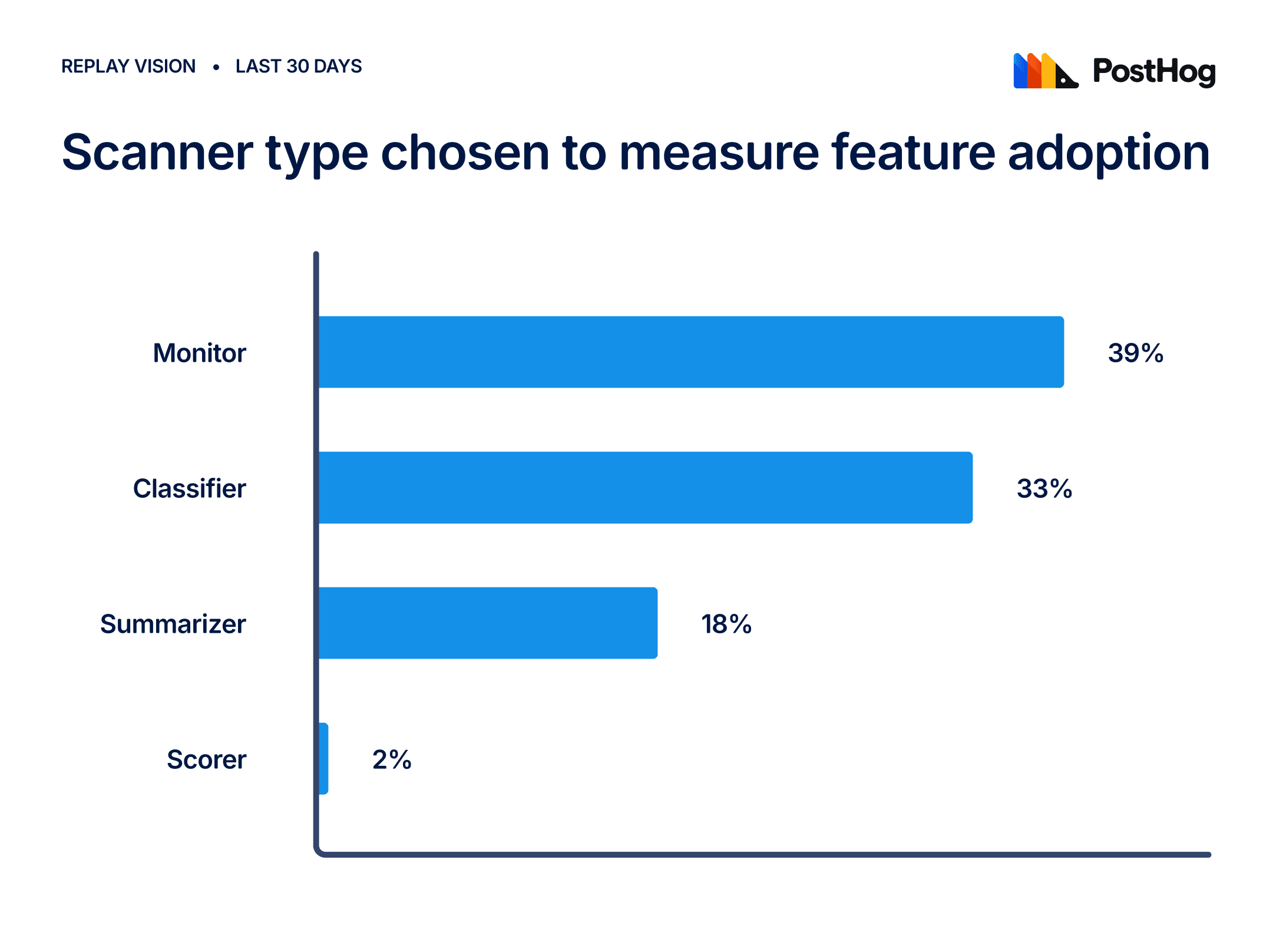
These are the scanner types people use to monitor feature adoption:
Common prompts for feature adoption/usage tracking
"Does anyone use this thing?" asked in many different ways:
- "I want to know if a feature is used and/or if they stay on it for long"
- "I want to see when users are using the X page"
- "Find sessions where users searched using X"
- "Find sessions when people have used all their videos, and also where they came back" (quota/return-visit tracking)
- "Find occurrences for the new edit settings" (checking adoption of a newly shipped setting)
- "Find sessions when users clicked on Get Access"
- "can you identify someone going through the auth flow, then either assign tag auth-login or auth-signup?"
- "can u tell me what users typically do in my app?" (the broadest, most open-ended version of this category)
- "I would like to track new users that come to our website, that signed up and what exactly they did afterwards"
- "can you setup a comprehensive monitor covering all major use cases" — one org asking for a single catch-all scanner rather than several narrow ones
Here are the specific feature types people track with Replay Vision:
4. Custom scanners for bug detection (9%)
Having this type of user is basically music to our team's ears. The pattern goes beyond Replay Vision: the user spots something in Error Tracking and comes to Replay Vision to see it happen to a real person.
If you use Error Tracking, this is the pairing worth setting up. Error Tracking tells you an exception fired, how often, and on which release. It cannot tell you what the person was doing when it fired, whether they noticed, or whether they gave up. A scanner pointed at the same failure gives you that: the sessions where it happened, what the user tried first, and whether they recovered. You get the stack trace and the person in one place, and you can tag the sessions so the next occurrence lands in front of you instead of waiting to be found.
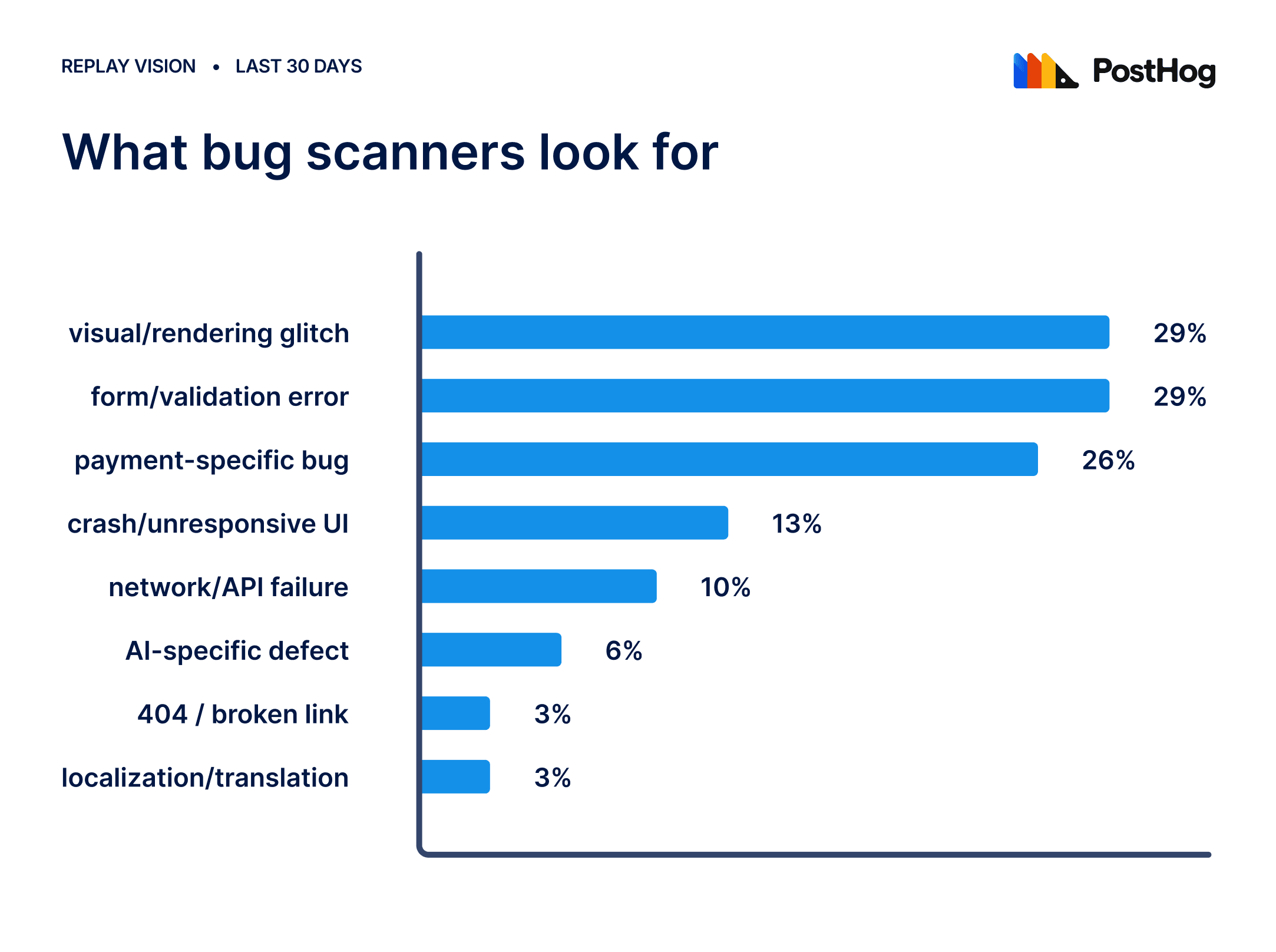
This is a different question from #1. Friction is "this is confusing," "this is slow," or "this made me give up." In the bug detection case, we're looking for things that don't work, things that are broken and have a cause, and we can somehow fix them.
Some examples include:
- A Shopify seller saw a variant-fetch failure in Error Tracking, then built a matching scanner tagging variant_fetch_failed
- A payment modal rendering wrong on iOS Safari (hitting people mid-payment)
- Broken lettering from a translation bug, costing them bookings
- A voice-AI company watching for the AI talking over people, barging in on responses, or cutting learners off mid-sentence
These are some bugs that scanners look for:
Common prompts for bug/error detection
More technical framing than the other categories, and several explicitly reference "bugs" or "error" by name rather than softer language like "friction":
- "Help me find bugs, ux issues and 404"
- "Catch error when click checkout"
- "Find sessions with mobile bugs"
- "Find sessions where users saw an error or got stuck"
- "Look users sessions where our AI failed and user got stuck" — an AI-product company hunting AI-specific failures
- "Find sessions where user didn't manage to pay because of an error or UX problem"
- "Find instances where user experienced friction, submission failure or UI error when interacting with the experiment variant/experience"
- "Find the most common OpenTrack issue / annoyance in the last 7 days"
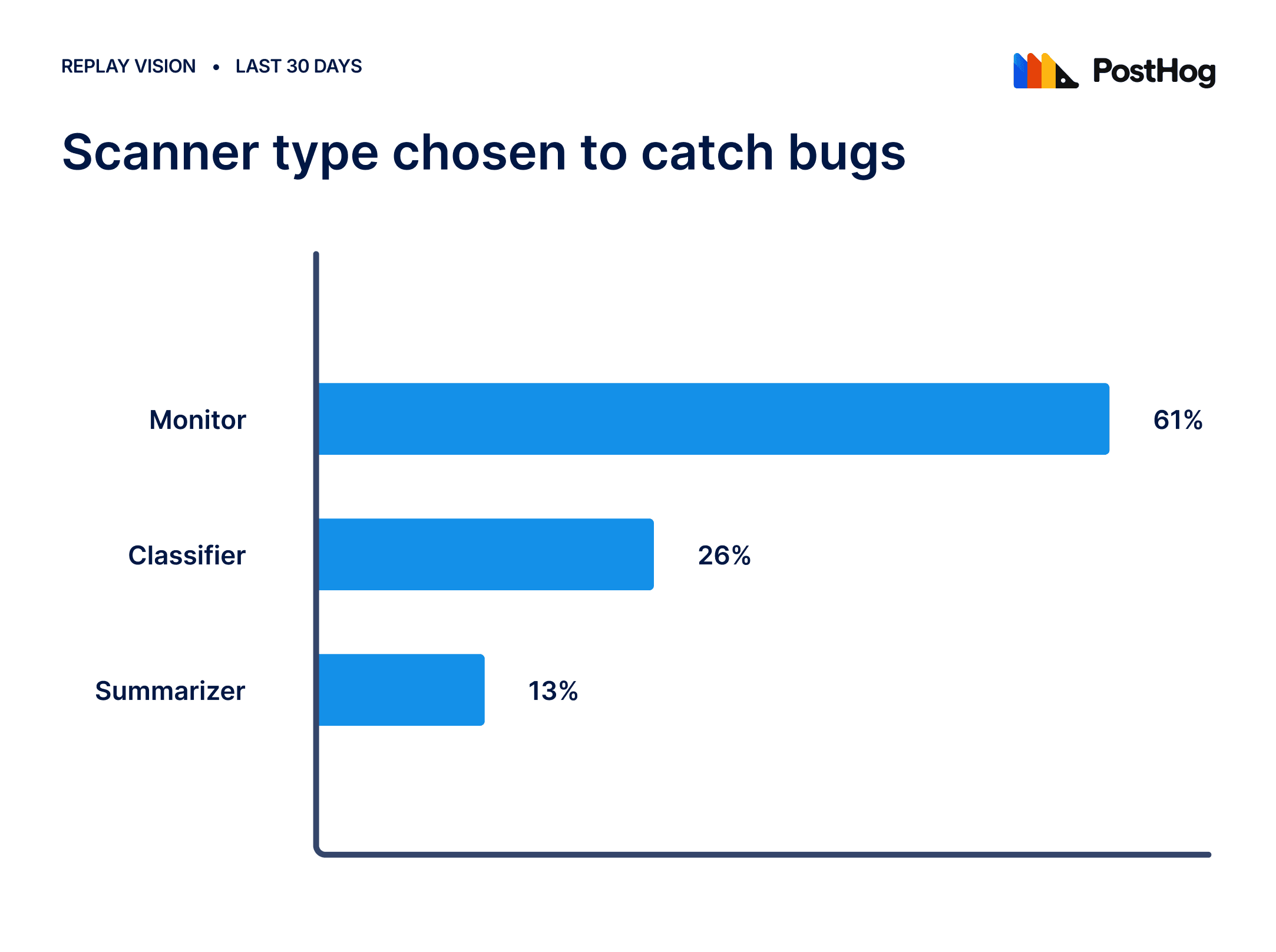
These are the scanners people use to catch bugs:
Bonus: Does a short prompt actually work?
Yes, for most people. Of the scanners where someone wrote their own prompt, two-thirds never touched it again, and 80% of those are still running a month later.
The third who did go back rewrote longer, from a median of 117 characters to 139, and fewer of those survived. Adding detail is what people try when a scanner is not finding the right thing, and it is often not the fix. Check what you pointed it at before you rewrite it.
So start short. Give it one sentence, let it run for a day, and read what comes back. If the sessions are wrong, the fix is usually in the filters rather than the wording.
Where to start?
The prompts converge on one place. Onboarding is the biggest cluster in the friction category and the biggest cluster in drop-off, and the same sentence about people getting stuck in it turns up across orgs with nothing in common but that. Thousands of teams, independently, decided that's the part of their product they can't see.
What is your equivalent? Onboarding, signup, and checkout are probably the easiest places to start and the flows where you'll catch the biggest frustrations. Point a scanner and see what happens.
PostHog is the leading platform for building self-driving products. With a full suite of developer tools – AI observability, product analytics, session replay, feature flags, experiments, error tracking, logs, and more – PostHog captures all the context agents need to diagnose problems, uncover opportunities, and ship fixes. A data warehouse and CDP tie it all together, unifying that context into one source agents can read across. You can steer it all from Slack, the web app, the desktop (PostHog Desktop), or your own editor via the MCP.